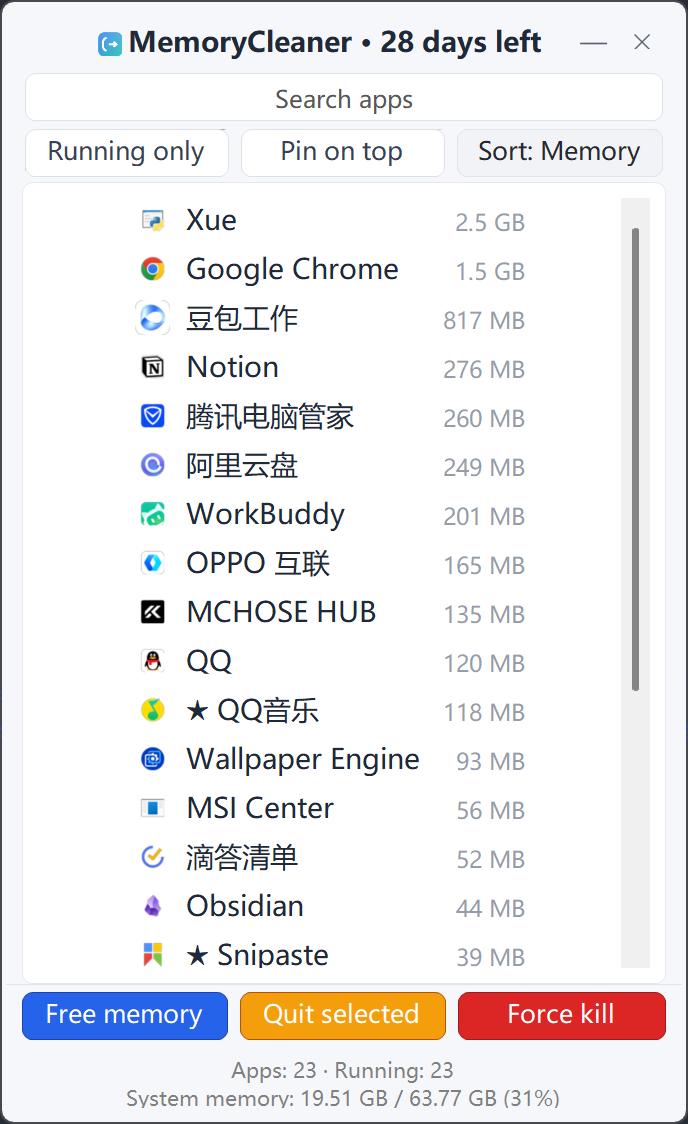
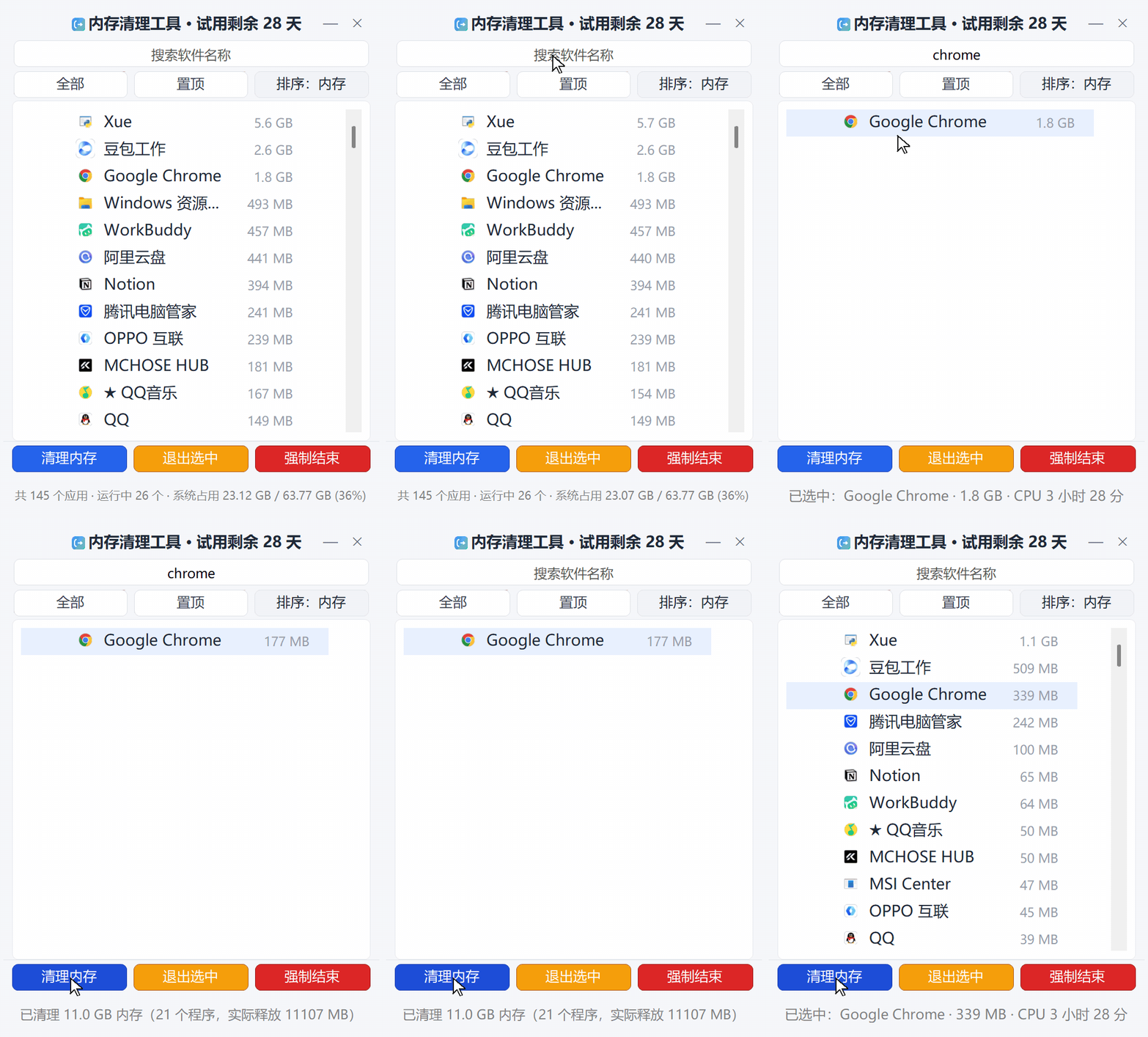
PC getting slow? MemoryCleaner puts every running app’s memory use on one screen, sorted by usage — see what is eating your RAM at a glance. Search in Chinese, pinyin or initials, batch-select and free it in one click, and watch the amount freed update instantly. About 2.5 MB, no extra runtime, no ads, no bundles.
No guesswork, no background magic. See exactly which app uses memory, then decide what to release — every step is visible.
Every running app listed by memory usage on one screen — spot the memory hogs without digging through Task Manager.
Select the apps holding memory and free it in one click — or end the process. Batch-select, and see how much was released right away.
Chinese, English, full pinyin and initials (wx for WeCom), with space-separated terms — find the right app in milliseconds.
Per-app usage plus the system-wide total, updated live — see exactly how much you freed before and after.
About 2.5 MB installer, tens of MB in memory — a cleaner should not be a burden itself. No ads, no bundles, no background downloader.
No network except update checks. No telemetry. Clean uninstall.
More RAM is not the problem — not knowing who uses it is. These are the moments it helps most.
Dozens of browser tabs, a chat app, Office and a meeting app all open — memory quietly runs out. Open it, spot the few real memory hogs, free them and get back to work.
Spend ten seconds clearing background memory hogs before launching a game — leave the RAM for the game itself, with fewer stutters and shorter loads.
A machine with 8 GB of RAM cannot afford silent background hogs. Knowing who uses it — and releasing it in time — is more direct than adding RAM.
It does not replace anyone: Task Manager is great for system troubleshooting, cleaner suites for all-in-one upkeep — MemoryCleaner just makes the memory job light and clear.
| Capability | Windows Task Manager | General cleaner suites | MemoryCleaner |
|---|---|---|---|
| See per-app memory use | Yes, one by one | Depends on product | One screen, sorted by usage |
| Free memory of a chosen app in one click | End the process manually | Usually blanket optimization | Yes, batch-select |
| Search by name or pinyin | No | Some products | Yes, instant |
| Installer size | Built into Windows | Tens to hundreds of MB | About 2.5 MB |
| Ads / bundles | None | Depends on product | None |
| Price | Included with Windows | Mostly free + subscription | $20 one-time |
Note: the table summarizes common, publicly visible behavior; actual features depend on each product’s version. No tool is being disparaged — pick what fits you.
Same features, switchable Chinese / English UI — layout adapts to each language.


Search, check the usage, release — done in seconds, with no pop-ups interrupting.

No subscription, no yearly renewals — pay once and keep using it. Start with a 30-day full-feature trial; refund within 7 days if not activated. Up to 5 devices per license, free re-issue when you change PC.
$20one-time
Download the latest build from this site. Older builds live in the downloads archive.
If Chrome blocks the .exe: click the arrow next to the download and choose Keep, or unzip the ZIP download and run Setup.exe.
Lightweight is a design goal, not a slogan — both the installer and resident footprint are easy to check yourself.
Activation window: new “Buy online” button (opens the web checkout with this machine code) and “Purchased? Get code” (enter your order number to fetch and validate the license automatically), in both languages. Online payment via WeChat/Alipay and PayPal/card; activation codes are issued automatically after payment.
English UI completion: 13 more strings (empty-state hints, batch summaries, CPU time, etc.) localized; long English status-bar lines now wrap instead of truncating. Crash hardening: the same exception no longer re-prompts repeatedly, and crash artifacts rotate instead of piling up.
Activation and About windows localized: activation checks, machine code, license status, buttons and version info all follow the language switch.
Downloads and updates unified on itzhanyi.top: one update source worldwide, no dependence on external code-hosting platforms.
Purchase, activation, device changes, refunds — and what “release memory” actually does.
No. It moves pages an app is not currently using out of physical memory; the app keeps running and pages back in automatically when needed. It is not a process kill — use Quit or End process separately when you really want to close an app.
Install and open the app, click “Buy online” in the activation window, then pay by PayPal or card on the web page. After payment, click “Already bought · fetch code”, enter your order number, and the activation code is filled in automatically.
No. Send the new machine code and we re-issue the code for free (up to 5 devices).
Full refund within 7 days if the license has not been activated.
The installer is unsigned; click More info then Run anyway. Functionality and safety are unaffected.
Chrome blocks unsigned installers. Either click the arrow next to the blocked download and choose Keep → Keep anyway, or use the ZIP download in the download section, unzip it and run Setup.exe — the result is identical.
No. Updates are free forever; the app notifies you and you update from this site.